Design System from Figma to Production in 24 Hours
135,000 nodes. Zero design tokens. One question: can an AI agent turn a raw UI kit into a fully tokenized, synced design system — in a single day?
The starting point: Untitled UI Free. A popular Figma UI kit with components but zero design tokens. No variables, no semantic naming, no code sync. Just raw hex colors and pixel values baked into 135,000+ nodes.
The tools: Claude Code + Figma MCP (which recently gained write capabilities — meaning the agent can not only read designs but modify Figma files programmatically).
Live Demo
Every component below is built from Figma tokens — change the type, hierarchy, size, or theme and see the live result.
Token Architecture
I structured tokens into three levels. Components never touch raw values.
/* Level 1: Primitives — raw palette */
--color-brand-600: #7f56d9;

/* Level 2: Semantic — role-based */
--background-brand-solid: var(--color-brand-600);

/* Level 3: Component — what code consumes */
--button-primary-bg: var(--background-brand-solid);
Pipeline
| Stage | Flow |
|---|---|
| Tokens | Figma Variables → Token Exporter → JSON → generate-tokens.mjs → CSS |
| Components | Figma Components → get_design_context → React |
| Sync | Token Change → Sync to Code → n8n → GitHub → Vercel |
Figma Plugins
The free Untitled UI had no variables at all. I built 6 custom Figma plugins to create and bind the token system:
| Plugin | What it does |
|---|---|
| Variable Promoter | Rebinds 3,433 nodes from Primitive to Semantic tokens |
| Token Exporter | Exports all 3 collections with alias chain preservation |
| Component Style Extractor | Extracts 528 variant×state token maps from component sets |
| Orphan Checker | Audits which Semantic tokens have zero consumers |
| Semantic Binder | Binds paint styles to variables |
| Component Token Generator | Creates the Component token layer |
Token Sync Automation
Enterprise Figma has built-in token sync via REST API. I'm on Professional — so I built my own with n8n:
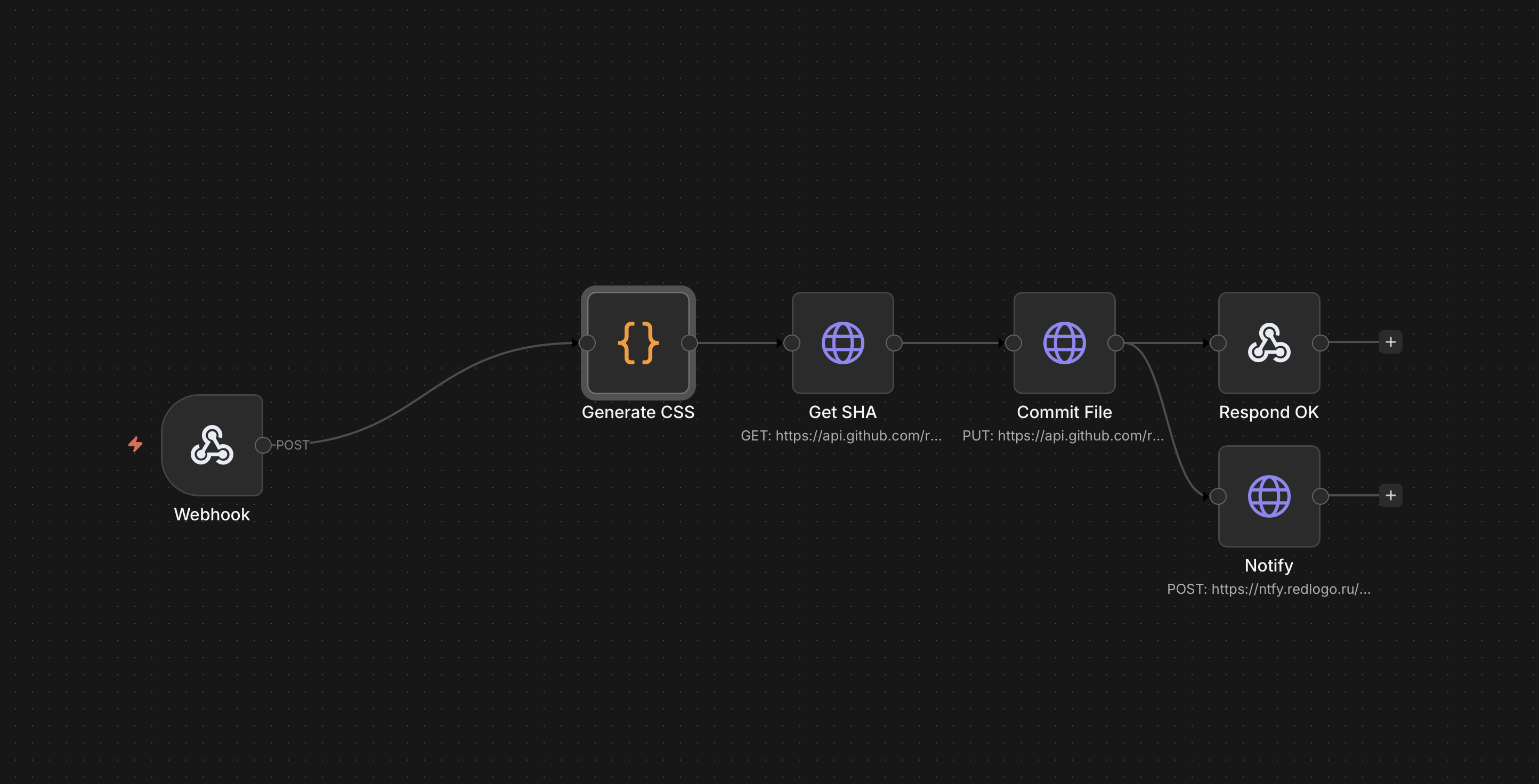
| Step | Manual? |
|---|---|
| Change token in Figma | Yes |
| Export + Sync to Code | 2 clicks |
| Generate CSS | Automatic |
| Commit to GitHub main | Automatic |
| Deploy to Vercel | Automatic |
| Push notification | Automatic |
What I Learned
Early in the process I started keeping an error log — every time something broke, I wrote down what happened, why, and what rule would prevent it next time. By the end of the day I had 8 entries. This log turned out to be the most valuable artifact of the entire project: it became a set of machine-readable rules that I fed back into Claude Code, so the same mistakes don't repeat in future sessions.
The GOLDEN RULE: Never rewrite Figma output. Adapt it.
| What went wrong | What I do now |
|---|---|
| Built generic components without reading Figma | Always get_design_context before code |
| Replaced Figma image assets with hand-drawn SVGs | Keep Figma asset URLs |
| Guessed token names | Copy exact names from Figma output |
| Skipped visual comparison | /figma-diff before every commit |
I also built two reusable Claude Code skills during this project: design-token-audit (3-level compliance checker) and figma-diff (automated visual comparison). Both are open — grab them if useful.
What I Think About All This
Figma MCP removes the last blocker for solo builders: programmatic access to design data without Enterprise. Before this, design-to-code required Enterprise tier or fully manual work. Now I can programmatically read variables, extract component structures, and write back.
But it's not magic. The AI follows patterns, not intent. Every time I let it guess instead of reading Figma data — plausible but wrong output. Treat Figma as source of truth, not inspiration.
The 3-level token architecture was the most valuable decision. It made everything else possible: theme switching, component overrides, sync that doesn't break.
Would I use this on a real project? Yes — with more upfront investment in the Token Exporter. Three iterations was two too many.
Results
Disclaimer: this is a practice project. I have no commercial plans for this design system. Untitled UI is used strictly for educational purposes under their free license.